Migrate SDK versions
This page covers migrations for current and previous versions.
Migrate from v4 to v5
Automate with AI Assistants
If you are using an AI coding assistant (like Gemini, Claude, or Cursor), you can ask it to read the plugin's distributed migration skill file at res://addons/admob/skills/godot-admob-migrate/SKILL.md to automatically guide the assistant in upgrading your codebase. See Agent skills for more details.
The following subsections describe breaking changes, behavior differences, and new APIs between major version 4 and 5.
Next-Gen Android SDK Migration
Version 5.0.0 migrates the underlying native Android plugin from the legacy Google Mobile Ads SDK dependency to the modern Google Mobile Ads Next-Gen SDK:
- Old dependency (v4):
com.google.android.gms:play-services-ads - New dependency (v5):
com.google.android.libraries.ads.mobile.sdk:ads-mobile-sdk
Mediation Conflicts
Because some legacy third-party mediation adapters may transitively pull the old play-services-ads or play-services-ads-lite library, compiling your Android build might result in duplicate class or symbol errors.
Automatic Remediation
The Godot export handler in version 5.0.0 automatically intercepts the Android export process and patches the project's Gradle file (res://android/build/build.gradle or res://android/build/app/build.gradle) to explicitly exclude the legacy dependencies:
// Added automatically by Poing Godot AdMob Plugin to support GMA Next-Gen SDK
configurations.configureEach {
    exclude group: "com.google.android.gms", module: "play-services-ads"
    exclude group: "com.google.android.gms", module: "play-services-ads-lite"
}
Asynchronous SDK Initialization Requirement
In version 5.0.0 (GMA Next-Gen SDK on Android), SDK initialization via MobileAds.initialize() is strictly asynchronous.
- Requirement: You must wait for the initialization to complete before loading ads (e.g. calling
RewardedAdLoader.load()orAdView.load()). - Consequence: Attempting to load ads before initialization finishes throws an uncaught exception:
MobileAds.initialize must be called before using the Google Mobile Ads SDK.
How to Migrate
Pass an OnInitializationCompleteListener listener to MobileAds.initialize() and load your ads only when the completion callback is triggered.
Querying Initialization Status
If you need to query the initialization status later, you can use the MobileAds.get_initialization_status() method.
Removed Smart Banner
The legacy Smart Banner format has been deprecated by Google and is completely removed from the plugin in v5.
| Language | Removed Sizing API | Replacement |
|---|---|---|
| GDScript | AdSize.get_smart_banner_ad_size() |
AdSize.get_current_orientation_anchored_adaptive_banner_ad_size(width) |
| C# | AdSize.GetSmartBannerAdSize() |
AdSize.GetCurrentOrientationAnchoredAdaptiveBannerAdSize(width) |
Backward Compatibility Fallback
For safety, both the Android and iOS native plugins implement an automatic fallback: if an old scene or layout still sends a size of -1 width and -1 height, the native bridge intercepts it and returns a standard Anchored Adaptive Banner size matching the screen width.
How to Migrate
Use Anchored Adaptive Banners instead. They are the official modern replacement, dynamically calculating the optimal height based on the device width and screen density.
AdPosition API Changes (Breaking Change)
In version 5.0.0, the AdPosition API has changed from a basic integer enum to a class instance. This allows positioning banner ads using either predefined static coordinates or custom pixel offsets.
| v4 API (Replaced) | v5 API (Replacement) |
|---|---|
AdPosition.Values.TOP |
AdPosition.TOP |
AdPosition.Values.BOTTOM |
AdPosition.BOTTOM |
AdPosition.Values.LEFT |
AdPosition.LEFT |
AdPosition.Values.RIGHT |
AdPosition.RIGHT |
AdPosition.Values.TOP_LEFT |
AdPosition.TOP_LEFT |
AdPosition.Values.TOP_RIGHT |
AdPosition.TOP_RIGHT |
AdPosition.Values.BOTTOM_LEFT |
AdPosition.BOTTOM_LEFT |
AdPosition.Values.BOTTOM_RIGHT |
AdPosition.BOTTOM_RIGHT |
AdPosition.Values.CENTER |
AdPosition.CENTER |
| Custom positioning unsupported | AdPosition.custom(x, y) |
How to Migrate
Update your banner creations and position updates to pass instances of the AdPosition class rather than the raw enum values.
Mediation Ecosystem Changes
The mediation ecosystem has been cleaned up and updated. Deprecated mediation partners have been removed, and several new networks are now supported.
Removed Mediation Networks
The following legacy mediation adapter has been removed due to deprecation:
- AdColony
Added Mediation Networks
Support for the following mediation networks has been introduced:
- AppLovin
- BidMachine
- Chartboost
- DT Exchange
- i-mobile
- InMobi
- IronSource
- LINE
- Maio
- Mintegral
- Moloco
- myTarget
- Pangle
- PubMatic
- Unity Ads
New Ad Formats
Version 5.0.0 adds first-class support for two new ad formats:
- App Open Ads: Shown when users load or resume the app. Loaded using
AppOpenAdLoaderand controlled usingAppOpenAd. - Native Overlay Ads: Render customizable Native Ads directly over the game using native templates (Small or Medium layouts) customized with styling (
NativeTemplateStyle,NativeAdOptions).
New Global Settings & Privacy Features
Several new API methods have been added to the MobileAds class and UserMessagingPlatform for consent, privacy compliance, and debugging:
- Ad Inspector: Open Ad Inspector via
MobileAds.open_ad_inspector(ad_inspector_closed_listener). - First-Party ID Option: Enable or disable publisher first-party ID with
MobileAds.set_publisher_first_party_id_enabled(enabled). - Consent Cookie Preference: Configure whether the SDK has consent for cookies via
MobileAds.set_gad_has_consent_for_cookies(enabled)and query it withget_gad_has_consent_for_cookies(). - Disable Crash Reporting (iOS only): Prevent the Mobile Ads SDK from catching and forwarding crash reports via
MobileAds.disable_sdk_crash_reporting(). - UMP Privacy Options: Show the privacy settings options form on demand via
UserMessagingPlatform.show_privacy_options_form(on_privacy_options_form_dismissed)and query its status usingConsentInformation.get_privacy_options_requirement_status().
Unified Configuration in Project Settings
In version 5.0.0, the plugin has unified all configuration options directly into Godot's native Project Settings under the admob/ section. This replaces any legacy configuration flows or custom editor menu inputs.
Breaking Configuration Change: Android config.gd Removed
In version 4, the Android AdMob App ID was set by modifying the static configuration script located at res://addons/admob/android/config.gd.
In version 5, config.gd has been completely removed. You must transfer your App IDs (both Android and iOS) to the new Project Settings location.
Critical iOS Change: Delete Legacy v4 AdMob .gdip Files (To Avoid Xcode Conflicts)
In version 4, iOS plugins were registered via .gdip configuration files placed in res://ios/plugins/.
In version 5, iOS frameworks and dependencies are added dynamically by the editor plugin during export.
You must delete all legacy poing-godot-admob*.gdip files and the res://ios/plugins/poing-godot-admob/ directory. (Do not delete the res://ios/plugins/ directory itself if you use other non-AdMob iOS plugins). Failing to remove old AdMob .gdip files and binaries will cause duplicate symbol and framework errors (Multiple commands produce ...) in Xcode.
Critical iOS Change: Clear Legacy Export Options (To Avoid Conflicts)
In version 5, you no longer need to manually set the Gad Application Identifier or check the old plugin options in the iOS Export Preset options. The plugin automatically reads the App ID from Project Settings and injects the necessary frameworks and GADApplicationIdentifier into your Xcode project's Info.plist during export.
It is critical that you clear these old fields and uncheck the legacy AdMob options in your iOS Export Preset. Failing to do so will result in duplicate symbol errors and plugin conflicts.
Mandatory: Upgrade Native Platform Binaries
After updating the editor plugin files (GDScript/C#) in your project, you must open the AdMob Manager in the Godot Editor and click Download & Install for both Android and iOS platforms to download the corresponding v5.0.0 native binaries.
If you attempt to export the project while having legacy (v4) or missing platform binaries, the export plugin will block the export process and output an error to prevent runtime crashes caused by version mismatch.
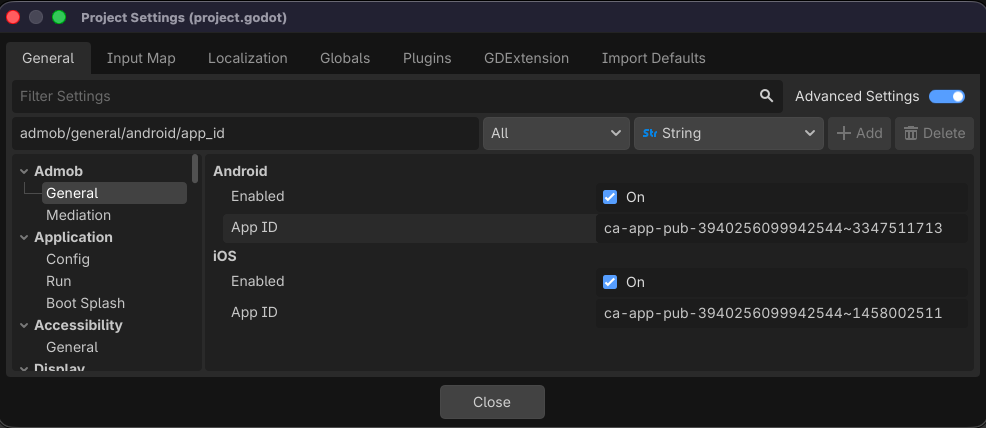
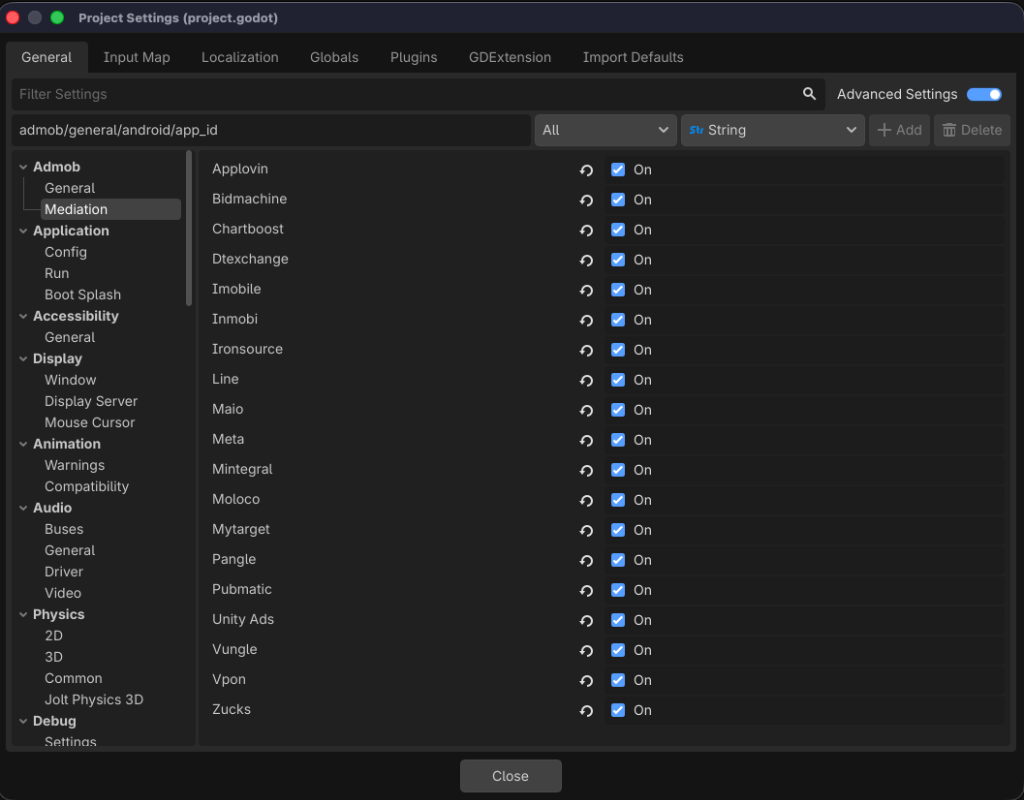
Configuration options are now registered and configured under Project Settings > General:
- Android Settings:
admob/general/android/enabled,admob/general/android/app_id, and optimization flags. - iOS Settings:
admob/general/ios/enabledandadmob/general/ios/app_id. - Mediation Networks: All mediation partners are enabled or disabled globally via boolean flags under
admob/mediation/(e.g.admob/mediation/applovin,admob/mediation/meta, etc.).
Headless Dynamic Binary Installer (CI/CD)
To support headless CI builds without bundling large native binaries in Git, v5.0.0 includes a synchronous downloader:
- When running in a headless environment (such as GitHub Actions), the plugin automatically checks for missing Android/iOS platform binaries.
- It automatically downloads and extracts them dynamically from official repository releases on plugin startup.